Image Generation
Generate ad-ready images from text prompts, with optional style presets and brand reference images.
Models
| Model | Description |
|---|---|
| Grok Image 2.0 | Detailed, general-purpose images (default). Supports the Quality setting |
| Grok Image | Fastest Grok images |
| GPT Image 2.5 Sunburst (precise) | OpenAI model that follows detailed briefs closely: exact colours, counts, layouts and character sheets. About 10 to 15 seconds at Medium |
| GPT Image 2.5 Flare (fast) | Faster OpenAI model for quick drafts, less precise on small details |
| Luma Photon 1 | Luma's image model |
| Luma Photon Flash | Faster Luma image model |
The GPT Image 2.5 models appear where your Ads Optimiser deployment offers them. Every image uses one image generation from your plan, whichever model makes it.
When to choose Sunburst
Grok suits open-ended scenes. Choose GPT Image 2.5 Sunburst when the image has to match a detailed brief, for example:
- Exact colours or counts: "an overshirt with exactly four buttons, top to bottom: grass green, teal, amber yellow, coral pink"
- Character sheets: the same person from set angles, a full-body shot and a close-up. Make each view a separate image rather than one composite
- Thumbnails with layout space: "face on the right, the upper third left empty for a title"
See Create an AI influencer for a worked example.
Automatic fallback to Sunburst
If a Grok image fails on the provider's side (a server error or a timeout), Ads Optimiser retries it once on GPT Image 2.5 Sunburst, with the same prompt and reference images. The job page then says so, for example:
- Generated with GPT Image 2.5 Sunburst after Grok failed (500).
- Grok timed out; retried once on GPT Image 2.5 Sunburst. (shown when the retry failed too)
The job's model is then the model that actually made the image. The retry still counts as one generation. Requests the provider refuses, such as a moderation block, are never retried.
Settings
Quality
Grok Image 2.0:
| Quality | Description |
|---|---|
| Low | Faster, around 15 seconds (default) |
| Medium | Highest detail, around 50 to 70 seconds |
| Auto | The model decides: low for new images, medium when editing with reference images |
GPT Image 2.5 Sunburst and Flare:
| Quality | Description |
|---|---|
| Low | Cheapest |
| Medium | Recommended (default), about 10 to 15 seconds |
| High | Most detail, costs more |
| Auto | The model decides |
Grok Image and the Luma models have no quality setting.
Example: same prompt, different settings
These three images use the same prompt, a 9:16 aspect ratio and 1K resolution. Only the model and quality change.
Ultra-realistic product shot of a sleek matte black cold brew coffee can glistening with condensation, resting on warm golden sand at golden hour. Palm fronds and turquoise waves softly blurred in the background. Warm cinematic sunlight casts long gentle shadows and a radiant rim light along the can's edge. Low angle, the can is the hero against an expansive horizon. Sun-kissed colour grading with teal and coral tones. No text or logos on the can.
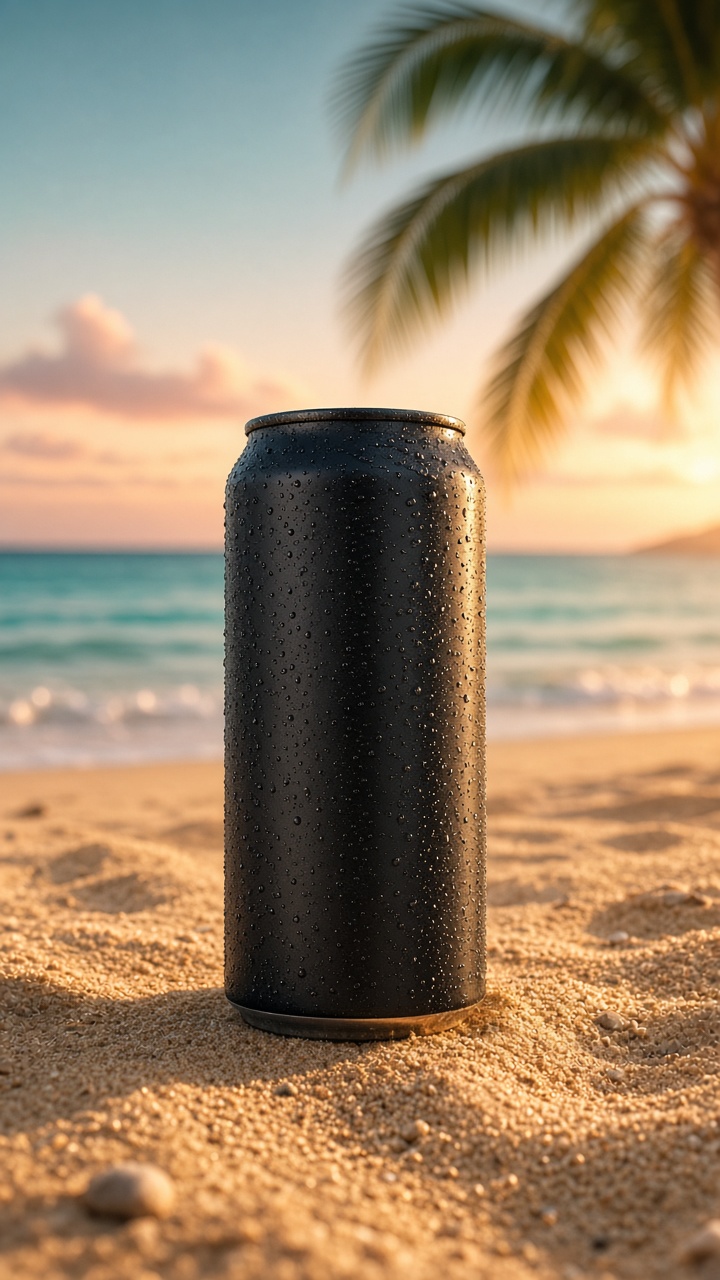 | 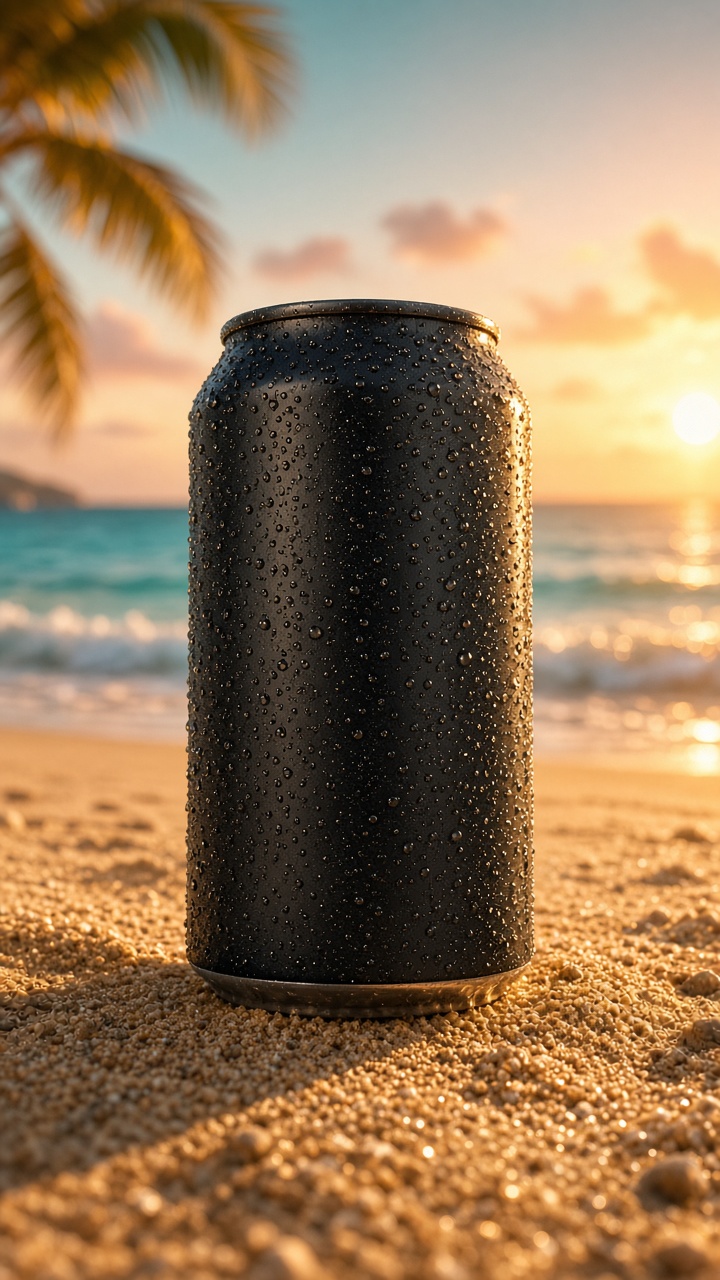 | 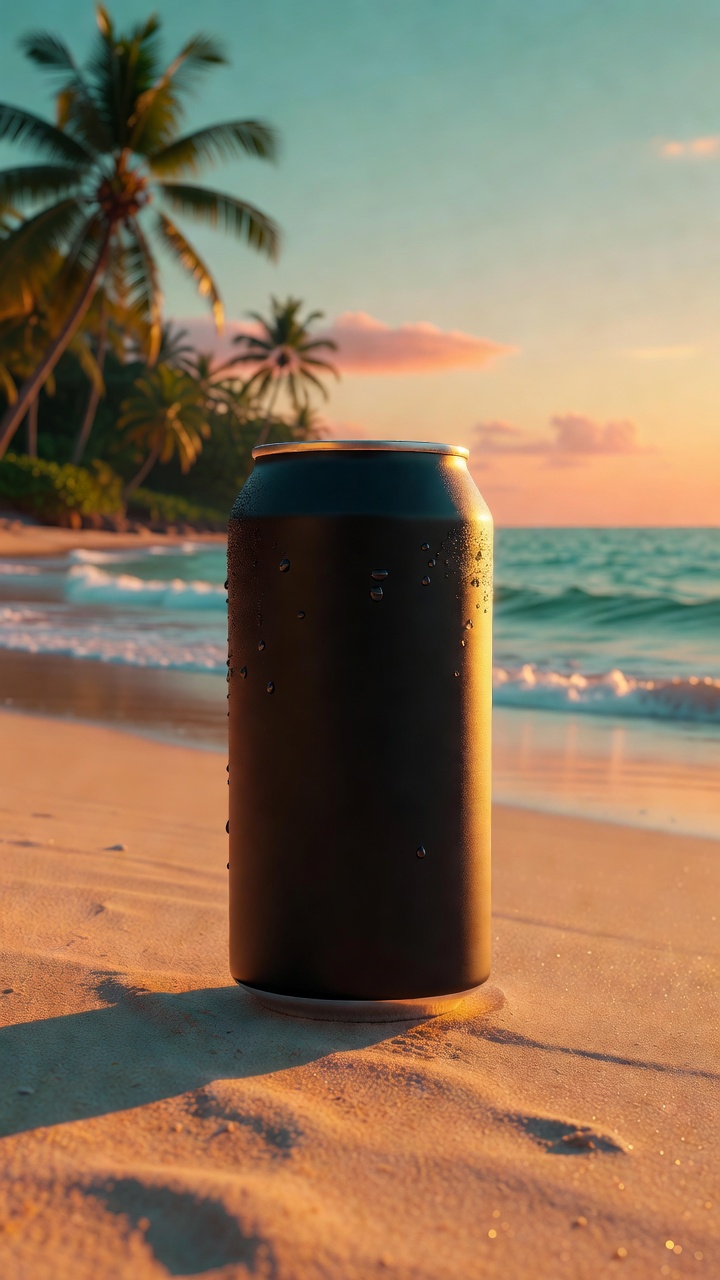 |
| Grok Image 2.0, Low About 14 seconds | Grok Image 2.0, Medium About 70 seconds | Grok Image About 6 seconds |
Low is a good default for drafts and variants. Switch to Medium for the final image when fine detail matters, such as condensation, textures or product edges.
Example: a detailed character brief
These images come from the same character description: a woman with a jet-black bob wearing a pale-sage overshirt with exactly four buttons, top to bottom: grass green, teal, amber yellow, coral pink.
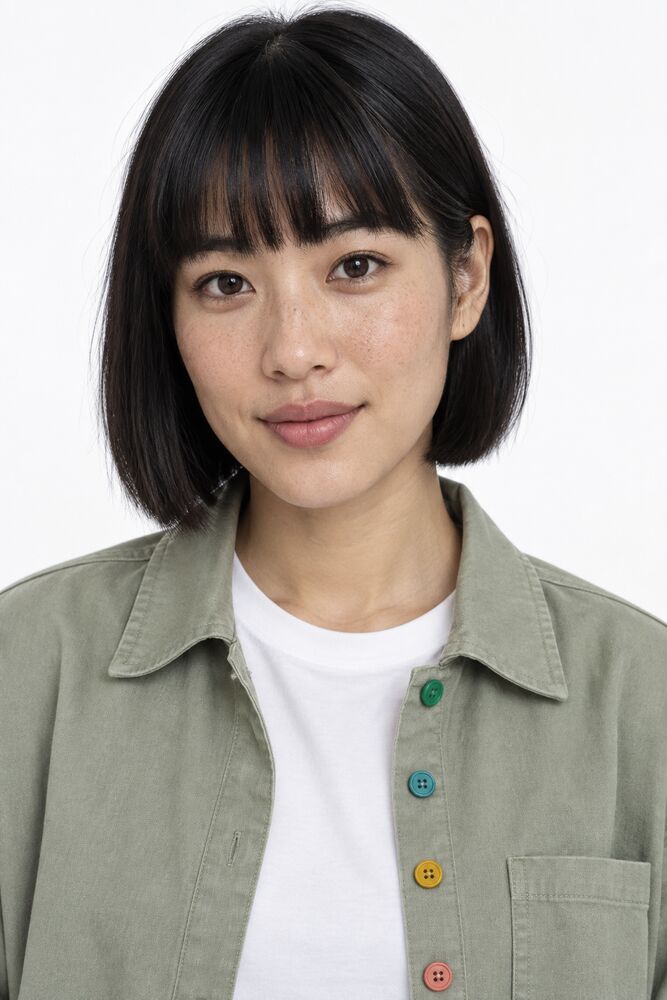 | 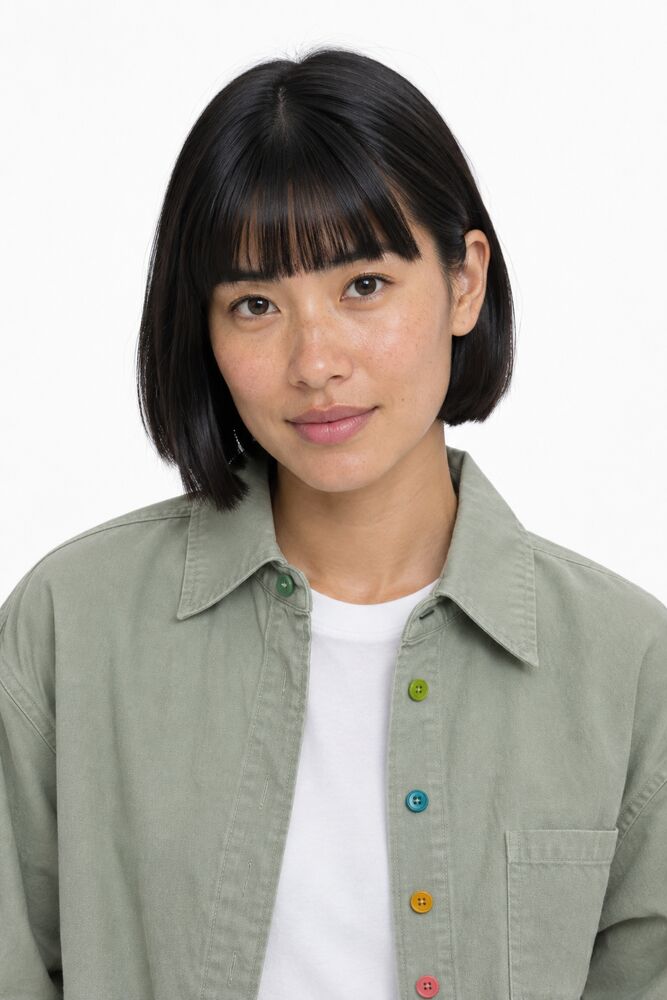 | 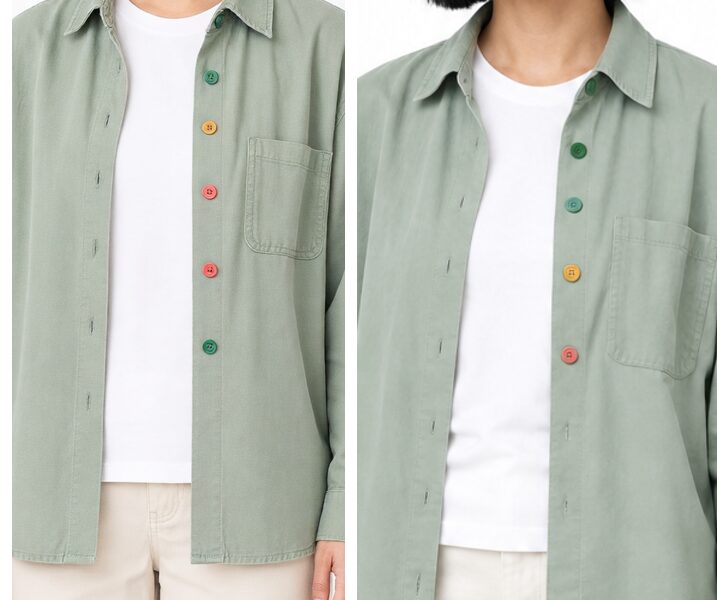 |
| GPT Image 2.5 Sunburst, Medium Four buttons, right order | GPT Image 2.5 Flare, Medium Close, but the green is lime | Zoomed in Left: Grok full-body shot with extra buttons. Right: Sunburst edit |
Aspect ratio
| Ratio | Use case |
|---|---|
| 9:16 | TikTok, Instagram Stories, Reels (recommended) |
| 16:9 | YouTube thumbnails, landscape ads |
| 1:1 | Social media posts, profile images |
| 4:3 / 3:4 | Presentations, portraits |
| 3:2 / 2:3 | Photography-style |
| 2:1 / 1:2 | Banners |
| 21:9 / 5:2 | Ultrawide and wide banners (Grok models) |
GPT Image 2.5 models deliver three sizes only:
| You choose | You get |
|---|---|
| 1:1 | Square, 1024 x 1024 |
| 2:3 or 9:16 | Portrait, 1024 x 1536 (9:16 is delivered as 2:3) |
| 3:2 or 16:9 | Landscape, 1536 x 1024 (16:9 is delivered as 3:2) |
| Auto | The model chooses |
Crop a 2:3 image to 9:16 if you need an exact TikTok frame, or keep important content away from the top and bottom edges.
Resolution
| Resolution | Description |
|---|---|
| 2K | Highest quality (recommended for ads) |
| 1K | Standard quality |
Resolution applies to the Grok models. The GPT Image 2.5 and Luma models size the image from the aspect ratio alone.
Style presets
Style presets append a style description to your prompt automatically:
- Cinematic: cinematic lighting, film grain, dramatic shadows, shallow depth of field
- Minimalist: clean aesthetic, negative space, muted tones, modern design
- Vibrant / Pop: saturated colours, bold contrast, energetic composition
- Professional: corporate look, studio lighting, polished finish
- Retro / Vintage: warm colour grading, nostalgic 70s–80s film look
- Neon / Cyberpunk: neon glow, dark background, vivid pink and blue accents
- Natural / Organic: soft daylight, earth tones, authentic lifestyle feel
- Luxury / Premium: rich dark tones, gold accents, elegant composition
- Product Photography: clean background, studio lighting, sharp product detail
- Lifestyle: candid natural moments, real-world setting, warm ambient lighting
Reference images
Add up to 5 reference images (4 with Luma models) to guide the AI. The GPT Image 2.5 models take up to 5, like Grok. The model blends your brand elements (logo, colours, products) into the generated image.
- Select from the media library (previously uploaded or generated images)
- Paste an external URL
- Without references, a new image is generated from scratch
Retry
If an image job fails or stalls, tap Retry on the job detail page to re-run generation with the same parameters.